Business process automation (CRM, invoicing, forms, API)
Connecting your websites, forms and software so data moves between them on its own.
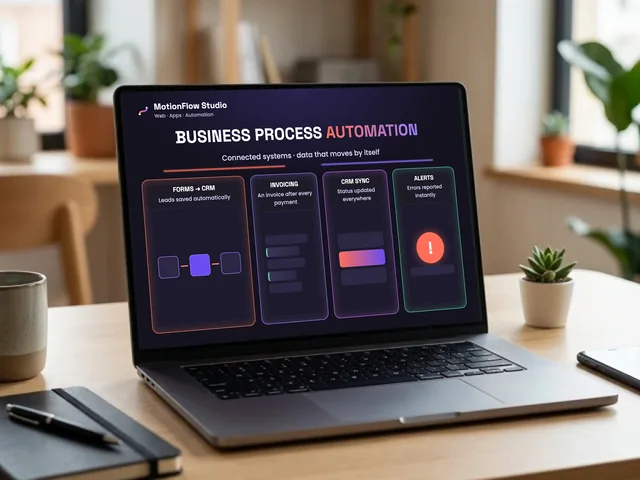
This service connects the separate websites, forms and software your business already uses and fully automates the data that moves between them. The goal is to end manual data entry — copying into spreadsheets, invoicing by hand, sending emails one by one — and replace it with stable, self-running background processes.
Depending on the task, I connect your systems with automation platforms (Make, n8n, Zapier) or with custom webhook and API integrations.
Which tasks and connections does the service cover?
- Lead handling and CRM sync
- Instantly and automatically forwarding web form data (Typeform, Google Forms, WordPress forms and others) to a CRM (e.g. HubSpot, Pipedrive, Zoho CRM), Notion or Google Sheets.
- Automatically creating tasks for the responsible team member when a new lead arrives.
- Connecting invoicing and payment flows
- Automatic receipt and invoice issuing in your invoicing system (e.g. Xero, QuickBooks) after a successful online payment (e.g. Stripe, PayPal) or an order.
- Automatically emailing the issued invoice to the customer and writing the payment status back to your database.
- Customer onboarding and email automation
- Granting access right after a purchase or sign-up, sending login details and starting welcome email sequences (e.g. MailerLite, ActiveCampaign).
- Automated status updates to the customer about each step of the process.
- Internal notifications and sync
- Instant alerts to your team on Slack, Discord or email about important events (e.g. a new purchase, a cancellation, an incoming error message).
- Data sync between systems (e.g. stock levels, booking slots).
- Custom API and webhook connections
- Connecting software or in-house tools that have no ready-made integration.
How does the project work?
- Mapping your systems and data flow: We review the software you use and clarify the inputs and outputs: where information must go, from where, and under which conditions.
- Designing the logic: I put together the data-movement logic and the necessary filters and conditions (e.g. the invoice is only sent once payment has actually been made).
- Setup and integration: I build the connection using APIs, webhooks or automation tools.
- Thorough testing and error handling: I run several scenarios with real and test data. I also set up basic error handling (for example an alert if an external service is down) so no data is lost.
- Handover and demo: I show you how it works and how it is configured, then hand over the finished system.
What does the handover include?
- The finished, tested and live workflows.
- Training for your team if needed.
- Basic error handling and alert logic to prevent outages.
- A short technical overview of the structure that was built.
- Monitoring after handover during the first live days, so any fine-tuning is solved immediately.
- By agreement, options for later maintenance, changes or further development.
How we work and how it is priced
- Fixed project price: Based on your exact needs and the number of systems involved, we agree on a fixed amount up front. There are no hours billed afterwards.
- Responsible handover: Most projects run through quickly, but for more complex processes I would rather spend more time testing than put an unreliable system live. Any extra testing time does not increase the agreed price.
- Requirement: I need access to the relevant software accounts (or API keys) from you.
Frequently asked questions
Which software and systems can be connected?
Practically any modern software that has an API, webhook support, or is available on the common integration platforms (Make, Zapier, n8n). I most often connect forms (Google Forms, Typeform, WPForms), invoicing tools (Xero, QuickBooks), CRMs (HubSpot, Pipedrive, Zoho CRM), email marketing tools (MailerLite, ActiveCampaign) and payment gateways (Stripe, PayPal). If you have a custom or older system with no direct connection, we look at the technical options during the needs assessment.
What do you need from me to start the project?
Two things: a clear description of the process logic (exactly what should happen: which data goes where, and under which conditions) and access to the accounts involved (team invitation, developer access or API keys), so the connections can be set up and tested.
What if a more complex task delays the project by a few days? Does the price go up?
No, the price does not change. We work with a fixed project price. If a technical obstacle, an API quirk or the more thorough testing needed for flawless operation takes 2–3 extra working days, I charge no surcharge for it. The goal is always that the system runs stably when it goes live, not that it is handed over half-finished.
Do I need separate subscriptions for the automation tools (e.g. Make, Zapier)?
Yes, the subscription costs of external platforms (invoicing, CRM or integration tools) are paid by your company directly to those providers. My fee covers the logic design, the connection, testing and going live. For small data volumes the free plans of those platforms are usually enough, and I always help you choose the cheapest sensible solution for the task.
What happens if an error occurs after handover, or one of the external services goes down?
I build basic error handling into every integration: if an external system is temporarily unavailable, the process does not lose the data but retries, and in the case of a critical error it sends an automatic alert. I monitor operation in the days after handover, and if you later want to add new features or need longer-term supervision, a maintenance agreement is possible.